
Table of Contents
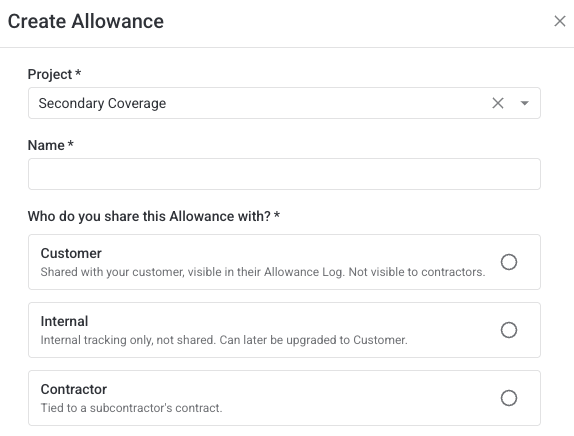
Every allowance in Clearstory belongs to one of three visibilities. The perspective you choose controls who can see the allowance, which CORs it can be applied to, whether it is in or out-of-contract, and how it's classified when imported.
At a glance
| Customer | Internal | Contractor | |
|---|---|---|---|
| Who can see it | You and your customer | Your company only | You and your subcontractor |
| Customer visibility | Yes | No | No |
| Contractor visibility | No | No | Yes |
| Applies to received CORs | Yes | Yes | Yes |
| Applies to sent CORs | Yes | Out-of-contract only | No |
| Import classification | In-contract | Out-of-contract | In-contract |
| Can be edited to another visibility? | No | Yes — to Customer | No |
Customer Allowance
Customer Allowances are written into your contract with your customer. They are shared with your customer and are visible to both parties in real time.They may align with a contractor, but the contractor has no visibility into the contract details.
- Applies to received CORs and sent CORs.
- Applying a Customer allowance to a received COR does not affect the requested total.
- Applying a Customer allowance to a sent COR affects the requested total.
- Allowances and draws against the allowance are only visible to you and your customer (if using Clearstory)
- Can be created as out-of-contract manually if no formal contract line item exists.
-
- When imported via CSV, Customer Allowances are automatically classified as in-contract
Allocate Customer Allowances to received CORs from contractors to get early visibility and tracking of spend. Contractors don't have visibility into draws on customer allowances.
Internal Allowance
Internal Allowances are visible only to your company. They are not shared with your customer or your subcontractors.They may align with a contractor or customer, but they are not visible to any party outside of your company. Use Internal Allowances to track cost risk, internal contingency, or discretionary holds that you don't want disclosed to your customer or subcontractors.
- Applies to received and sent CORs
- Applying an Internal allowance to a received COR does not affect the requested total.
- Applying an Internal allowance to a sent COR does not change the COR's requested amount. It is a tracking mechanism only, not visible to external parties.
- When imported via CSV, Internal Allowances are automatically classified as out-of-contract
- Allowances and draws against the allowance are only visible to you
You have the ability to update an Internal Allowance to a Customer Allowance at any point in your project. But, you cannot update a Customer or Contractor Allowance to an Internal Allowance.
Contractor Allowance
Contractor Allowances are written into your contract between you and your contractors. Both parties have real-time access to status, value, and balance. Your customer has no visibility into these. Use Contractor Allowances to track allowance budget tied to a specific subcontractor's scope so both parties always see the same remaining balance as CORs come in.
- Applies to received CORs only.
- Applying a Contractor allowance to a received COR affects the requested total.
- Your customer has no visibility into contractor allowances or their draws
- Can be created as out-of-contract manually if no formal contract line item exists.
- When imported via CSV, Customer Allowances are automatically classified as in-contract
In-contract vs. out-of-contract
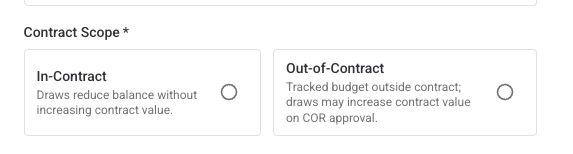
An in-contract allowance is tied to an existing contract in your project. Draws against in-contract allowances count toward that contract's budget and are reflected in COR cost calculations.
An out-of-contract allowance tracks internal budget for scope that falls outside a formal contract line item or when no contract exists yet. Draws against out-of-contract allowances do not change the COR's requested amount. This is made explicit in the Allowances dialog when you apply the draw.
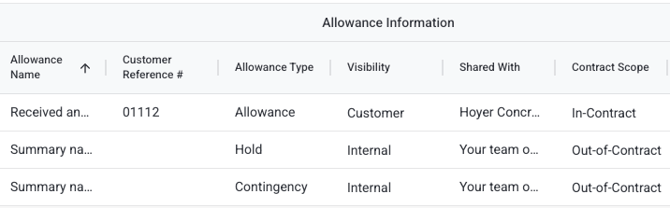
You can create out-of-contract Customer and Internal allowances manually via the Create Allowance modal. Internal Allowances default to out-of-contract when imported.