
Overview
On a Clearstory project that is connected to CMiC, you can bring in the project's CMiC contracts in one pass instead of adding them one at a time. Clearstory creates the Clearstory contracts for you and links them back to their CMiC vendor and contract.
This is handy when you skipped contracts when the project was first set up, the project was connected to CMiC without importing contracts, or new CMiC contracts show up on the job later.
Before you start
- The Clearstory project has to be connected (mapped) to a CMiC project. If it is not connected to CMiC, you will not see the import option.
- You need permission to create contracts on the project (the same access required to add a contract manually).
- CMiC has to be enabled for the project's office.
Step 1: Open the project's contractors
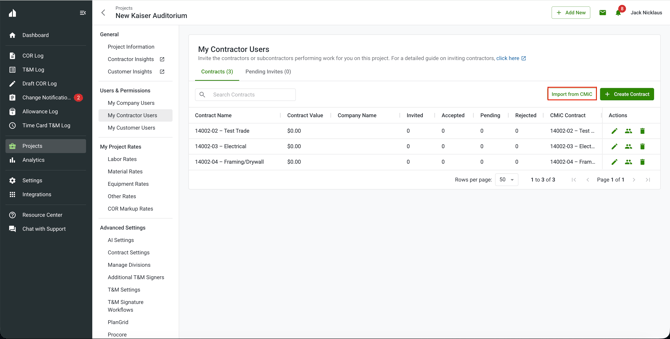
Go to the CMiC-connected project and open My Contractor Users.
Step 2: Start the import
Click Import from CMiC.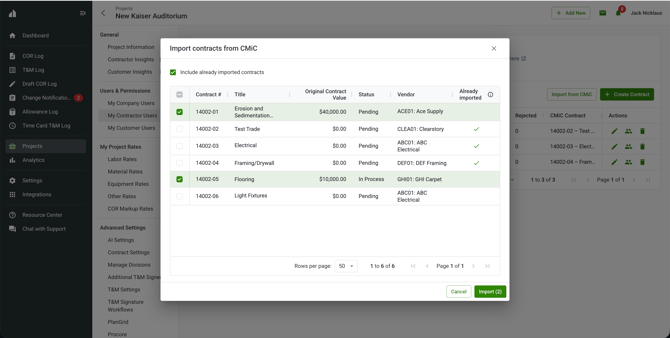
Step 3: Choose the contracts to import & Import
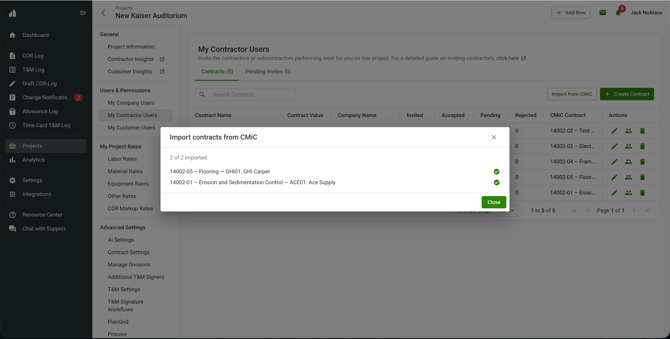
Select the CMiC contracts you want to bring in. The list shows each vendor alongside its contracts, so you can pick any combination across vendors. Click Import. Clearstory creates the selected contracts, links each one to its CMiC vendor and contract, and adds them to the project.
A contract that is already linked to a Clearstory contract on this project is marked with a check. That is informational only — you can still select it, but importing it again creates another Clearstory contract for the same CMiC contract.
Frequently asked questions
Why don't I see Import from CMiC?
The project has to be connected to a CMiC project, CMiC has to be enabled for the office, and you need permission to create contracts. If any of those is missing, the option does not appear.
What does the check mark next to a contract mean?
It means that CMiC contract is already linked to a Clearstory contract on this project. It is just a heads up — you can still import it, which creates a separate Clearstory contract for the same CMiC contract.
Do I have to import all of them at once?
No. Select as many or as few as you want. You can come back and import more later.
How is this different from importing a whole project from CMiC?
Importing a project from CMiC creates a brand new Clearstory project. This brings contracts into a project that is already connected to CMiC.